How to save all your open tabs in Chrome and reopen them later
Save a Chrome window as bookmarks or a tab group, then how Orbit Station 1.9.3 saves it as a stack and closes duplicate tabs with Undo.
On this page
This post is from the team that builds Orbit Station.
You can save the tabs in a Chrome window and open that set again later. Google's keyboard shortcuts, checked November 13, 2026, list "Save all open tabs as bookmarks in a new folder" as Ctrl + Shift + D on Windows and Linux, and Command + Shift + D on a Mac. A tab group can be closed and opened again from the bookmarks bar or the Chrome menu. Google's tab help for computers, checked the same day, describes that. Orbit Station, from the Chrome Web Store, can save the same window as a stack and leave the tabs open.
Save every open tab as a bookmark folder
The shortcut saves the tabs in the current window into a new bookmark folder.
On Windows and Linux, press Ctrl + Shift + D. On a Mac, press Command + Shift + D. Chrome asks you to name the folder. Those are the shortcuts in Google's shortcut help, under "Save all open tabs as bookmarks in a new folder."
To find the folder later, use the bookmarks bar or the full list. Google's bookmark help, checked November 13, 2026, says you can select a bookmark in the bookmarks bar. More, then Bookmarks and lists, then Show bookmarks bar turns the bar on or off. The same page says More, then Bookmarks and lists, then Show all bookmarks opens the list when the bar is off or the bookmark is not on it.
The folder is a set of ordinary bookmarks. Open the pages you want from that folder. When you want Chrome to put the set away and bring the same group back, use a tab group.
The shortcut page lists "Reopen previously closed tabs in the order they were closed" as Ctrl + Shift + T on Windows and Linux, and Command + Shift + T on a Mac. That brings back closed tabs. It does not store a named set for next week.
Close a tab group and open it later
Google's tab help for computers says to create a group like this:
Right-click a tab.
Select Add tab to group, then New group, or an existing group.
To name it, right-click the colored circle or the name to the left of the tabs.
To put the group away, right-click the group and select Close group. Google says a closed group is not deleted. It is saved in the bookmarks bar or in the menu, and you can open it again.
Open it from the bookmarks bar by clicking the grid icon, then the name. From the menu, select More, then Tab groups, then the group. If the groups are missing from the bookmarks bar, open Settings, then Appearance, and turn on Show tab groups in bookmarks bar. The same Appearance settings include Automatically pin new tab groups to the bookmarks bar. Google says this also pins new tab groups from your other devices that use the same Google Account.
Close group keeps the set. Delete group removes it on your device and on other devices that use the same Google Account.
Save the window as a stack
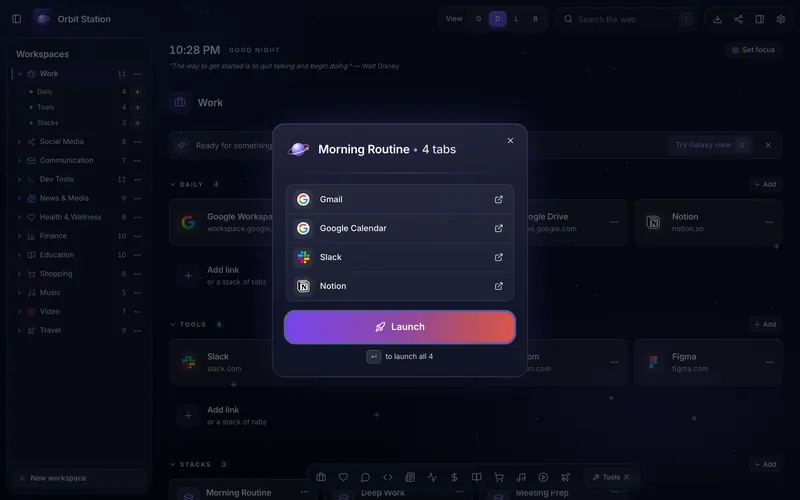
A stack in Orbit Station is a saved list of pages. Launch opens that list again. Save your tabs as a stack names the shortcut: Session Capture is Command + Shift + 0 on a Mac and Ctrl + Shift + 0 on Windows and Linux. Press Launch on the new tab when you want the pages again.
Session Capture saves the window and leaves the tabs open. In the 1.9.3 build, the command is described as "Save current window as a stack." An Incognito window is skipped. Save your tabs as a stack says Orbit never lists, saves, or closes tabs in Incognito windows. The new stack is titled with the date, the time, and how many tabs were saved, and filed under Captured Sessions. Launch reuses those tabs or opens a new window.
If Command + Shift + 0 or Ctrl + Shift + 0 does nothing, another extension may already be using that shortcut. Open chrome://extensions/shortcuts and set "Save current window as a stack" there.
Save your tabs as a stack says that closing a tab loses anything typed into a form on that page. Session Capture does not close tabs, so that applies when you close them yourself, or when you use Close duplicates.
Close duplicates from the side panel
Click the Orbit icon in the toolbar. The side panel opens beside the page you are on. What's new describes that 1.9 panel: today's focus, stacks with Launch, and open tabs grouped by window. Pin Orbit from the Extensions menu (the puzzle piece) if the icon is hidden.
Close duplicates is the button at the bottom of that panel, for the same address open more than once. What's new says Orbit shows the copies before anything closes. It keeps the pinned copy, or else the one you used most recently. Pinned tabs, and tabs that are playing sound, never close. You confirm, and then the extra copies close.
Undo brings the closed copies back. Text you had typed into a form on a closed tab is not restored. Save your tabs as a stack says closing a tab loses anything typed into a form on that page.
In an Incognito window the side panel says "Clean-up is off in Incognito." The clean-up buttons are not on that panel. That matches the line on Save your tabs as a stack: Orbit never lists, saves, or closes tabs in Incognito windows.
Install Orbit Station from the Chrome Web Store.
FAQ
How do I bookmark every tab in a Chrome window?
Press Ctrl + Shift + D on Windows or Linux, or Command + Shift + D on a Mac. Google's shortcut help calls this "Save all open tabs as bookmarks in a new folder." Name the folder, then open the bookmarks from the bookmarks bar or from More, Bookmarks and lists, Show all bookmarks.
How do I reopen a Chrome tab group?
Right-click the group and select Close group. Google's tab help says a closed group is not deleted and is saved in the bookmarks bar or in the menu. Open it from the bookmarks bar, or from More, then Tab groups.
How does Orbit Station save open tabs without closing them?
In Orbit Station 1.9.3, press Command + Shift + 0 on a Mac or Ctrl + Shift + 0 on Windows and Linux. Session Capture saves the current window as a stack and leaves the tabs open. Press Launch on the new tab to open the stack again.
Can I undo Close duplicates?
Yes. Close duplicates shows the extra copies first and waits for you to confirm. Undo reopens the copies it closed. It does not bring back text you had typed into a form on those tabs. In an Incognito window, the side panel says "Clean-up is off in Incognito."