Common new-tab problems and how to fix them
Five new-tab problems, Chrome's built-in fix for each, and how Orbit Station 1.9.4 handles them with stacks, capture and the side panel.
On this page
This post is from the team that builds Orbit Station.
Five problems show up again and again on a new tab: too many tabs, a window you just closed, a new tab that does not help, the same sites typed every morning, and duplicate copies of one page. For each one, Chrome already has a built-in step. Orbit Station 1.9.4, the version the Chrome Web Store listing installed on November 19, 2026, then does a specific thing on top. The product details below are in that 1.9.4 build, and what's new describes them too. A wider tour of the current build is What Orbit Station does today.
Too many tabs
Chrome's own control is Memory Saver. Personalize Chrome performance says you turn it on at More, then Settings, then Performance, and pick Moderate, Balanced, or Maximum. Inactive tabs are set aside. Playing audio or video, a pinned tab, a download, and a partly filled form are among the things that can keep a tab active, and you can name sites that should stay active. The help page does not give a number of megabytes saved, and this post will not invent one.
That still leaves the tabs in the strip. In Orbit Station 1.9.4 a stack is the set of pages you meant to keep. The store listing says Stack all and close skips pinned tabs and tabs that are playing sound, saves the rest of the window as one stack, checks that save, and then closes what it saved. Undo puts them back. The side panel lists open tabs by window, and Recently cleaned keeps the last 10 clean-ups on the device. What's new says the first run shows what will close and asks before it runs.
A window of tabs you closed
Chrome's shortcut for this is on the keyboard shortcuts page: Command+Shift+T on a Mac, and Ctrl+Shift+T on Windows and Linux, "Reopen previously closed tabs in the order they were closed." Press it again for the one before that. Chrome's tips also say you can continue where you left off, on the pages that were open the last time you used Chrome, by setting your startup pages.
If you want the window saved before it is gone, Orbit Station 1.9.4 has Session Capture. Command+Shift+0 on a Mac, or Ctrl+Shift+0 on Windows and Linux, saves the current window as a stack. The 1.9.4 manifest describes that command as "Save current window as a stack", and the store listing says the same. You can launch that stack later from the new tab or from the side panel. The steps for saving a window this way are also on Save your tabs as a stack.
A new tab that is not helping
Chrome's new tab can be shortened. Customize your New Tab page says that, with Google as the default search engine and you signed in, you choose Customize Chrome. Under Shortcuts you can pick My shortcuts or Most visited sites, or turn Show shortcuts off. You can set a theme, and you can hide cards such as Resume browsing.
Orbit Station 1.9.4 replaces that new tab. Workspaces hold the links and stacks for one area of work. The store listing describes four views of those workspaces: Galaxy, Grid, List and Board. The side panel is the other half. Click the Orbit icon and it opens beside the page you are reading, with today's focus, the timer, stacks, the read-later list, and the open tabs.
The same sites every morning
Chrome's built-in place for a set of sites is bookmarks. Create, find and edit bookmarks says you bookmark a page from the star, show the bookmarks bar, and add a folder from Bookmark Manager or by right-clicking the bar. You then open those bookmarks from the bar. That is the step Chrome's help documents for keeping a group of sites.
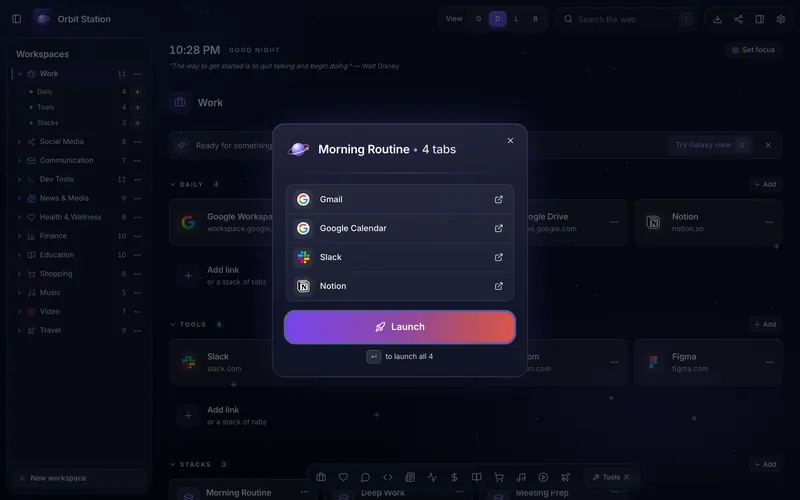
In Orbit Station 1.9.4 you save that same group as a stack and launch it in one click. The manifest suggests Command+Shift+1 or Ctrl+Shift+1, and Command+Shift+2 or Ctrl+Shift+2, for the first two stack hotkeys. The listing says a shortcut from 1 through 9 can launch a stack from anywhere in the browser once you set it. The cover on this post is that launch: a Morning Routine stack with its Launch button.
Duplicate copies of one page
Chrome's help does not describe a single command that closes every duplicate for you. What it does describe is finding the tab and closing that one. Manage tabs in Chrome says you open Tab Search from the tab strip, type, and choose Close on the right of the row you do not want. The shortcuts on that page are Ctrl+Shift+A on Windows and Linux, and Command+Shift+A on a Mac. The same page says you can type @tabs in the address bar, press Tab or Space, and pick the tab.
Orbit Station 1.9.4 has Close duplicates on the side panel, and on the Orbit icon's right-click menu. The store listing says it shows every extra copy first and keeps the pinned copy, or else the one you used most recently. Pinned tabs and tabs playing sound are not closed. Undo brings the closed copies back, and so does Recently cleaned. You see the list before anything closes.
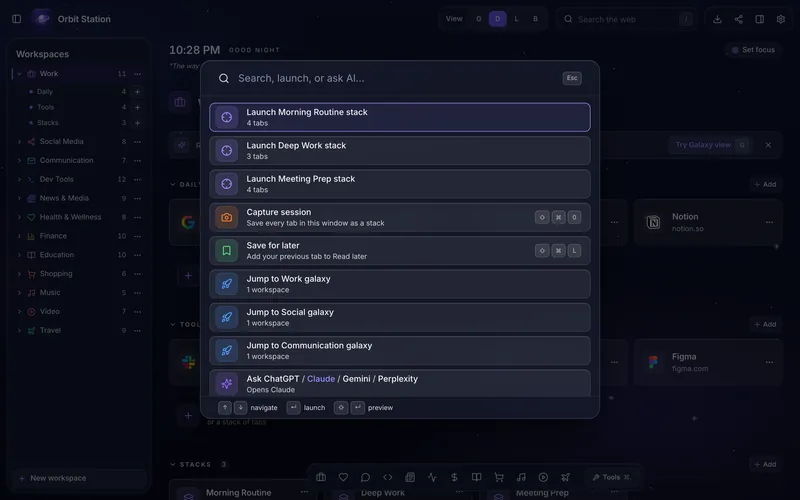
Command+K or Ctrl+K on the Orbit new tab opens that palette. From it you can jump to an open tab in any window, switch workspace, or run Capture session. What's new describes the same search. Undo on a clean-up notice, and Recently cleaned, sit beside Chrome's Command+Shift+T or Ctrl+Shift+T. The Chrome shortcut is still the first thing to try on a tab you closed by hand.
FAQ
What should I try first when Chrome feels bogged down by tabs?
Turn on Memory Saver. Chrome's performance help puts it at Settings, then Performance, with Moderate, Balanced, or Maximum. Orbit Station 1.9.4 can then save the window as a stack and close the tabs it saved, with Undo.
How do I get a closed window back?
Press Command+Shift+T on a Mac, or Ctrl+Shift+T on Windows and Linux. Chrome's shortcut help says that reopens previously closed tabs in the order they were closed. To keep a window on purpose, use Session Capture: Command+Shift+0 or Ctrl+Shift+0 saves it as a stack.
How do I stop retyping the same sites each morning?
Put them in a bookmark folder and open them from the bookmarks bar. That is Chrome's documented step. In Orbit Station 1.9.4, save the same pages as a stack and launch the stack in one click.
How do I close duplicate tabs?
In Chrome, open Tab Search (Command+Shift+A or Ctrl+Shift+A) and close the extra row. In Orbit Station 1.9.4, Close duplicates on the side panel lists the extra copies first, keeps the pinned or most recent one, and Undo brings back what it closed.